Monday, March 13, 2023

Future of SAP PS module


SAP PS (Project System) module is a widely used project management tool used by businesses around the world. It provides an integrated approach to project management, enabling businesses to plan, execute, and control projects effectively. SAP PS module has been a popular tool for decades, but as technology continues to evolve, there are questions about what the future of SAP PS module will look like.


The future of SAP PS module is likely to be shaped by several factors, including technological advancements, changing business needs, and evolving project management practices. In this blog, we will explore some of the trends that are likely to shape the future of SAP PS module.
  • Cloud-Based Solutions
One of the most significant trends that will shape the future of SAP PS module is the shift towards cloud-based solutions. Cloud-based solutions offer several benefits over traditional on-premise solutions, including lower costs, greater flexibility, and improved scalability. As businesses increasingly adopt cloud-based solutions, we can expect to see a corresponding shift towards cloud-based SAP PS solutions.


Cloud-based SAP PS solutions will enable businesses to access project management tools from anywhere, at any time, on any device. This will be particularly valuable for businesses that have remote teams or that need to collaborate with partners and suppliers located in different parts of the world.
  • Automation and AI
Another trend that will shape the future of SAP PS module is the increasing use of automation and AI. Automation and AI technologies can be used to automate repetitive tasks, reduce manual errors, and improve project efficiency. As these technologies become more sophisticated, we can expect to see a corresponding increase in their use in SAP PS module.


For example, AI technologies can be used to predict project outcomes based on historical data, identify potential project risks, and recommend optimal project management strategies. Automation technologies can be used to automate project scheduling, resource allocation, and budgeting, freeing up project managers to focus on more strategic tasks.
  • Integrated Project Management
Integrated project management is another trend that will shape the future of SAP PS module. Integrated project management involves the integration of different project management functions, such as project planning, scheduling, cost management, and resource management, into a single system. This approach enables businesses to manage projects more efficiently, by reducing the need for manual data entry and improving data accuracy.


SAP PS module already offers integrated project management capabilities, but we can expect to see these capabilities become even more sophisticated in the future. For example, we may see greater integration with other SAP modules, such as SAP Finance and SAP HR, to provide a more holistic view of project performance.
Greater Flexibility

Finally, we can expect to see greater flexibility in the future of SAP PS module. As businesses continue to evolve and change, they will require project management tools that can adapt to their changing needs. This may include the ability to customize project management workflows, integrate with other third-party tools, and support agile project management methodologies.

SAP has already started to offer greater flexibility in its SAP PS module, with the introduction of new features such as SAP Fiori and SAP HANA. These technologies enable businesses to customize their project management workflows and provide real-time data analytics, enabling faster and more informed decision-making.

In conclusion, the future of SAP PS module is likely to be shaped by several factors, including cloud-based solutions, automation and AI, integrated project management, and greater flexibility. Businesses that are able to embrace these trends and adopt new technologies will be well-positioned to succeed in the increasingly competitive project management landscape. As SAP PS module continues to evolve, we can expect to see more powerful and sophisticated tools that enable businesses to manage their projects more efficiently and effectively.

Monday, March 6, 2023

How to Trigger an email from Milestone Confirmation in SAP PS


Business Scenario:

The Project milestones is the important functionality of SAP PS which is used to map events of particular events (such as completion of critical project stage etc.). The milestones can be utilized for multiple purpose (like Milestone billing, Progress analysis, milestone trend analysis etc.).

Whenever Network activity to which milestone is attached is confirmed, actual date will transferred to Milestone automatically.


Impact of milestone actual date:

Whenever milestone is confirmed, Billing block in the sales order billing plan will be removed. We can raise the invoices against Sales Order as per Milestone invoicing percentage.

Another use of Milestone confirmation is that upon completion of Project stage should notify the other stakeholders of the Projects.

We can divert the mail triggered with milestone confirmation to few business user by taking ABAPER's help.

We have to execute following steps to trigger a mail after milestone confirmation.
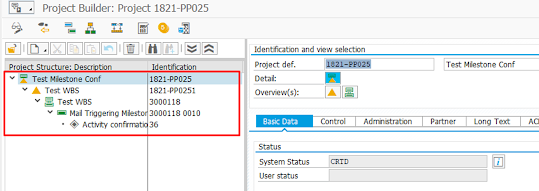
Step 1. Create Project structure (i.e. WBS element, Network, activity, Milestone) in the Project Builder (CJ20n) transaction.


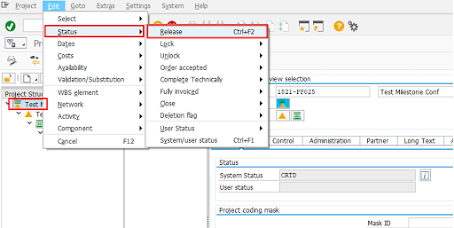
Step 2. Release the project & Select project definition > Edit > Status > Release


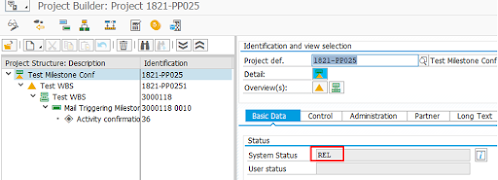
Project released successfully.


Step 3: We have to maintain the parameters to trigger a mail from Milestone confirmation.

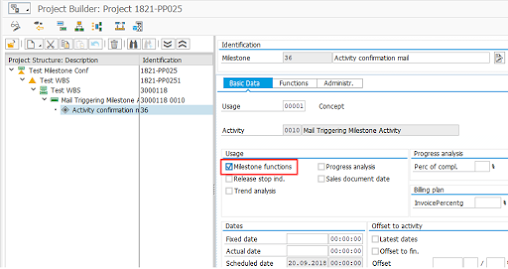
Maintain the Prerequisites for Mail triggering – Click on milestone function & select functions tab of Milestone


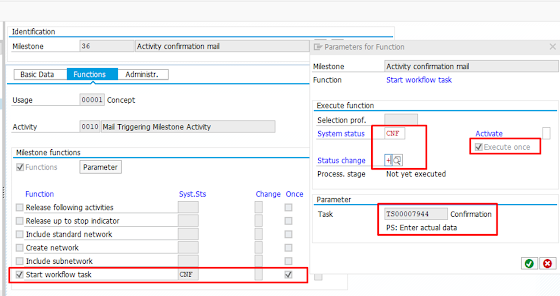
Workflow task defined for Milestone confirmation:
System Status: we have to mention the system status at which mail will be triggered.
Status Change: With this key you determine when the function is activated. In our case, + stands for Status set.
Execute once: Use this indicator to specify that the milestone function can only be triggered once.
Task: TS00007944 (PS: Enter actual data)


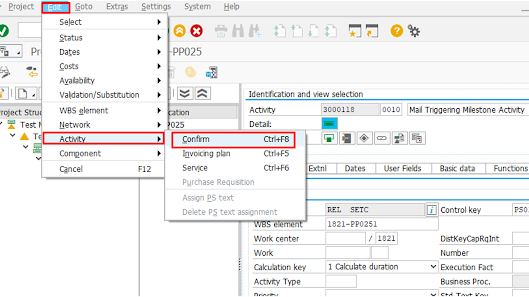
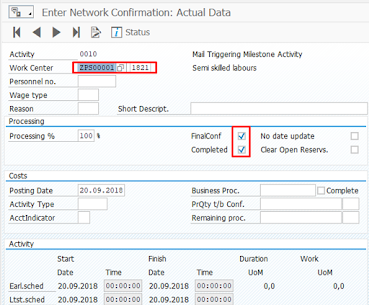
Step 4: Confirm the Network activity


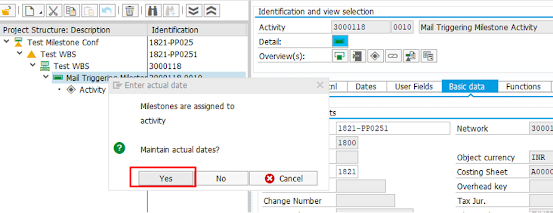
We have to enter necessary inputs to Confirm the network activity


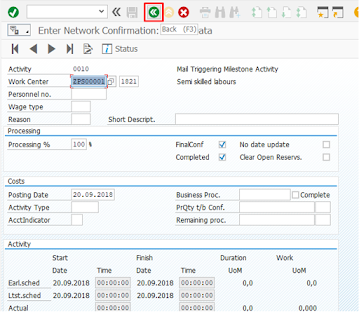
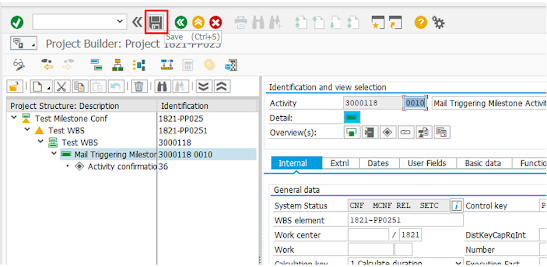
After entering the confirmation parameters in the activity confirmation screen, press back icon (or press Shift button)


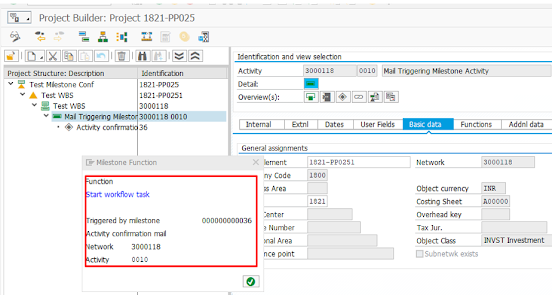
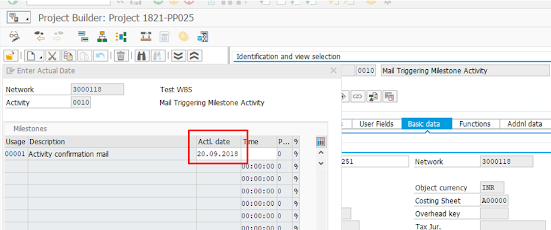
Whenever actual date updated in the milestone, it will give a following pop up for workflow triggered.
We have to consult Workflow / ABAP consultant to divert the mail triggered to selected user id's.


In conclusion, email triggering with milestone confirmation in SAP PS can be a powerful tool to keep project stakeholders informed about the progress of a project. By following the steps outlined above, you can set up email triggering with milestone confirmation in SAP PS and ensure that project stakeholders are always up to date with the latest project information.


- March 06, 2023
Email ThisBlogThis!Share to TwitterShare to FacebookShare to Pinterest


No comments:


Post a Comment


Home

Subscribe to: Post Comments (Atom)

How to Trigger an email from Milestone Confirmation in SAP PS

How to Trigger an Email for Milestone Confirmation in SAP PS Business Scenario: The Project milestones is the important functionalit...

MM17- Material master mass update

Update planned delivery time in Material Master data Concept: The MM17 is the mass maintenance transaction in the SAP. MM17 executes transac...